HOW
TO CHOOSE A SUBSCRIPION PLAN THATS RIGHT FOR YOU |
The number of pictures
you can store with each plan varies depending on your camera model
and the size preferences you select for sharing (as seen below 1 & 2).
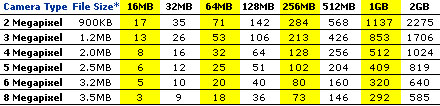
The chart below will
assist in choosing a plan that's right for you.
You can get an idea
of how much storage space images by taking into account the consumption
of your cameras digital storage card, this of course will change depending
on your cameras resolution setting. Comparing different resolution
settings and storage space taken can provide a comparative basis.
First calculate how many
pictures your card can hold, divide the capacity of your card by
the average
file
size
of your
images. For example, if you use a 3 mega pixel
camera that produces
an average photo file size of 1.2MB and have a 256MB card,
divided by 1.2 gives you approximately 213 pictures.
Always shoot
in the highest resolution, this way you can use the full content if
you wish after loading your photos into the icu software
Photo Viewer. The preferences you select will change the amount of
space you require as in the example below.
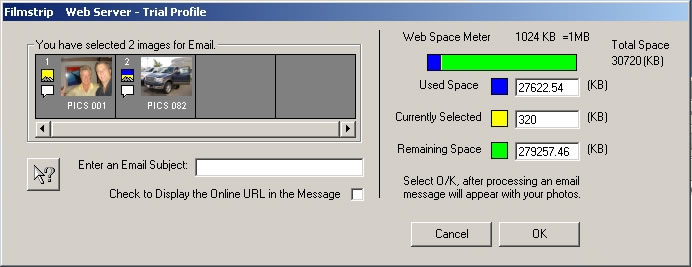
You can also determine
how much space you are using in the icu software application . After
selecting photos to share a Film Strip Form (bottom example) provides
you with the total kb selected, amount of space used
and remaining.
| APPROXIMATE
NUMBER OF IMAGES PER WEB SPACE CAPACITY |
|
|
|
|
|
MB
= megabytes GB= gigabytes |
* Average
file size using cameras highest resolution JPEG mode. The actual number
of images per card will vary and depends on the camera model and compatibility
of the scene being photographed.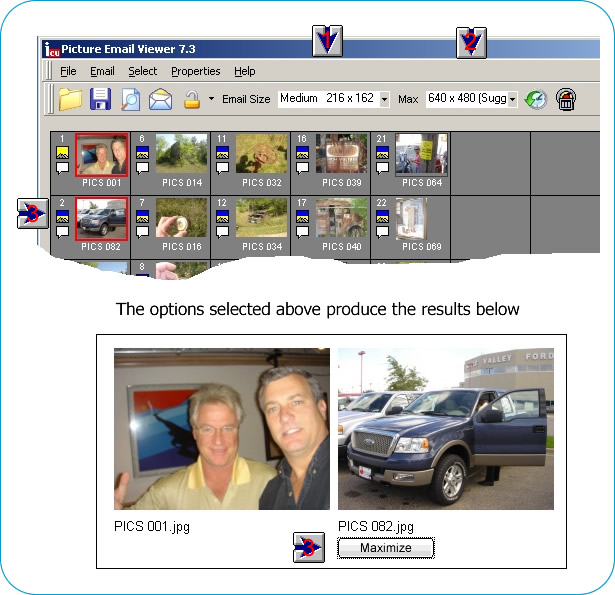 |
The example above produces the following files and respective
file sizes
| 2 photos 216 X 162 |
62kb |
| 1 max photo 640 X 480 |
249kb |
| 2 html pages |
3kb |
The total instance will acquire approx 264 kb
Picture Pay file sizes are greater due to the fact products are displayed
within a Showcase and Header of your choice (add aprox 7kb per photo).
When using hotspots you can add a considerable amount of kb due to the additional
supporting files.
Below is an example of photos that have selected for publishing or email.
|
|
|